By Michael Delpierre, CEO, Conversion Pipeline Published November 9, 2026.
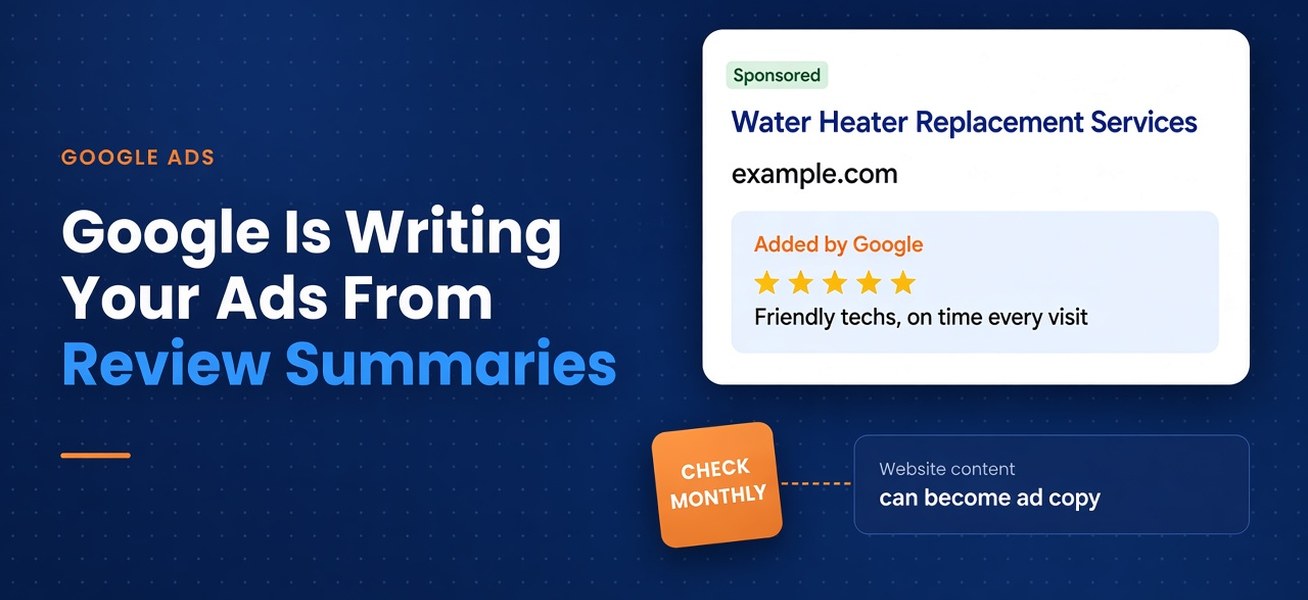
Picture a homeowner searching "water heater replacement" on a Saturday morning. Your ad shows up. Under your headline sits a line you never wrote, summing up what your customers say about you. Another headline mentions a spring discount you ended in April.
Both came from Google. One came from your reviews, the other from your own website. If that material is old or messy, the ad will be too.
What Google Actually Changed
Google's help page, About Review summaries, describes AI-written summaries of online reviews that appear directly inside Search ads. What matters for owners:
- The summaries pull from reviews "from across the web," not only Google reviews. Google doesn't say which sites.
- They are positive only, and you cannot edit or customize the text.
- They run in English-language Search campaigns in the US, UK, Australia, and India.
- Every vertical is eligible except sensitive categories. Pharmaceuticals is the only one Google names, so don't assume a dental office or law firm is excluded.
Google's page doesn't explain how to turn them off, and a November 5, 2026 breakdown from WebFX notes the automated assets settings don't list them either.
Your Website Is Also Writing Your Ads
Google's text customization documentation says it generates extra headlines and descriptions from your domain, landing page, existing ads, and keywords, partly by "taking snippets from landing page titles, descriptions, and meta tags."
Since September 2026, campaigns using it are being upgraded to AI Max automatically. When a landing page changes, the generated assets refresh within 48 hours. Google's own advice is to "ensure your website content is accurate," because its AI "relies heavily on this content as its source material."
Then there's Final URL expansion, on by default when a campaign opts into AI Max. Google may swap the landing page you picked for another page on your site that it thinks fits the search better, then write a headline to match.
Put plainly: any page on your site can become an ad, and any sentence on that page can become a headline.
The Settings That Let You Turn Some of This Off
Much of this can be switched off. Not all of it. Here's the breakdown, per Google's help pages.
Things you can turn off:
- Text customization. The campaign setting, formerly called automatically created assets, that writes copy from your site. Google's instructions put it in each campaign's AI Max settings, under "Asset optimization." Unchecking it stops the generated assets and also turns off Final URL expansion. You can also turn AI Max off for a campaign entirely.
- Final URL expansion. Uncheck it to keep clicks on the landing pages you picked. Or leave it on and add URL exclusions for pages that should never get a paid click.
- Account-level automated assets. Google can also add dynamic sitelinks, dynamic callouts, dynamic structured snippets, automated promotions, and seller ratings across your whole account. Each type can be turned off under Assets, then "Account level automated assets," then "Advanced settings."
- Auto-applied recommendations. Google can apply some recommendations automatically, including "Improve your Responsive Search Ads," which writes headlines from your final URL and existing assets. Uncheck these one at a time in the auto-apply settings on the Recommendations page.
Things you can limit but not switch off:
- Text guidelines. If you keep text customization on, text guidelines, still labeled a beta, let you block up to 25 words or phrases and add up to 40 plain-language rules per campaign, like "Don't mention prices."
- Pinned headlines. Pins still protect lines you wrote, but Google says they aren't used when Final URL expansion picks a different page.
- Brand exclusions. These AI Max settings keep your ads off searches tied to specific brands. They control where you show up, not what the ad says.
The thing you can't turn off: review summaries. Google says advertisers can't edit them, and its help page doesn't describe an opt-out. Your reviews are the only lever.
One caution. Google sells these features as ways to reach more searches, so switching them off can shrink your reach or raise your cost per lead. Make that call with your ad manager, after looking at what each feature actually produced.
Why an Outdated Website Now Costs You Money
A stale page used to hurt rankings slowly. Now it can show up in a paid ad within days. Picture Google picking up:
- A "Free AC tune-up with any repair" banner from two summers ago.
- A service area page for a county you stopped covering.
- "Starting at $99" on a service that now starts at $189.
- A dental page listing a procedure your practice dropped when an associate left.
The Structural Foundation Google Reads Best
One service per page
If roof repair, roof replacement, and gutter work all live on one long "Services" page, Google has to guess which part fits a search for "gutter guard installation." Give each core service its own page. We see this constantly in local SEO work: a single page listing twenty towns or ten services tends to rank for none of them.
Clean titles, headings, and meta descriptions
Google says text customization pulls from page titles, descriptions, and meta tags. Those are the basics of on-page SEO. Write them as if they'll appear in an ad, because now they might.
A clear page hierarchy
Home, then service categories, then individual services, then location pages. Any page that should never get a paid click, like an old promo, should be fixed, removed, or added as a URL exclusion.
Schema markup and Google Business Profile consistency
LocalBusiness structured data tells Google your name, address, phone, and hours in a format it doesn't have to guess at. Those details should match your Google Business Profile exactly. Google's local ranking guidance says complete, accurate information helps you show up locally.
Fast pages on a phone
If a click lands on a page that loads slowly on a phone or hides the phone number, you paid for a visit that never became a call. Our web design and development team builds around that gap: when the ad and the page don't match, people leave.
Reviews Are Now Ad Copy, So Manage Them Like It
The themes in your reviews now matter as much as the star rating.
Ask every happy customer, every time
Google recommends a review link or QR code. Build it into the job: the technician hands over a card, or the front desk texts a link. One caution from Google's review guidelines: offering discounts or freebies in exchange for reviews is prohibited.
Read your reviews for themes
Once a month, read your last 20 reviews. What keeps coming up? Showed up on time? Left the house clean? Explained the bill? Painless cleaning? Those are the phrases a summary is likely to use. If nobody mentions what you most want to be known for, find out why.
Reply, including to the bad ones
Keep replies short and specific, with no sales pitch. For a negative review, acknowledge the issue and take the details offline.
A Monthly Checklist for Business Owners
Block 45 minutes on the first Monday of each month.
- Search your own ads. Look up your five to ten most important services the way a customer would, like "emergency plumber [your town]."
- Screenshot what shows. Save the full ad, including any review summary, with the date and search term.
- Ask for the "Added by" report. Google Ads marks which assets it generated. Ask your agency for last month's auto-generated headlines and descriptions, flag anything wrong, and confirm which of the settings above are on.
- Check the pages Google chose. With Final URL expansion on, the landing pages report has a "Selected by" column. Make sure none of those pages embarrass you.
- Audit your top service pages. Check services, pricing, service areas, hours, and offers.
- Match your website to your Google Business Profile. Name, address, phone, hours, and categories.
- Read last month's reviews. Reply to any you missed and note the themes.
- Watch booked jobs, not just clicks. If calls rise but booked work doesn't, something in the ad, possibly copy you didn't write, is attracting the wrong people.
If nobody in your business owns steps 3 and 4, start there. Our free PPC audit is an easy way to see what's actually running in your account.
Where Conversion Pipeline Fits
Our PPC team still writes your ads ourselves. What has grown is the time we spend on top of that, making sure Google's AI isn't rewriting them or showing them where they don't belong. That means reading the headlines Google generated, checking the search terms report for searches we never meant to target, confirming which landing pages Final URL expansion picked, and adding brand or URL exclusions when an ad drifts. A bad line or a bad placement still costs you the click.
In business since 2009, Conversion Pipeline runs SEO, websites, and PPC management for local businesses under one roof. Your website and your ads now draw from the same material, so they need to be managed together.
If you want a second set of eyes on what Google is writing into your ads, or on whether your site is giving it good material, reach out to our team. We'll tell you in plain English what we see.
FAQ
Can I turn off Google's AI review summaries?
Not as far as Google has documented. Text customization, Final URL expansion, account-level automated assets, and auto-applied recommendations all have off switches. Review summaries don't, so you shape them through your reviews.
Can I stop Google from writing headlines from my website?
Mostly, yes. Turn off text customization in each campaign's AI Max settings, turn off the account-level automated assets you don't want, and uncheck "Improve your Responsive Search Ads" in auto-apply. Expect some loss of reach, so make the call with your ad manager. Keep your site accurate either way.
Does this apply to dental practices and law firms?
Google only names pharmaceuticals as excluded, so many dental, cosmetic, and legal advertisers are likely eligible. If your ads go through compliance review, tell that person.
How often should I check?
Monthly at minimum, plus right after any website change, price update, or new promotion.
Free audits
Find out where your ad spend and leads are leaking
Our free PPC audit digs into your Google Ads account for wasted spend, weak tracking and missed opportunities. Want the bigger picture? A free lead-source mini-audit shows which channels actually bring in your calls and form fills.