
By Michael Delpierre, CEO, Conversion Pipeline Published November 25, 2026.
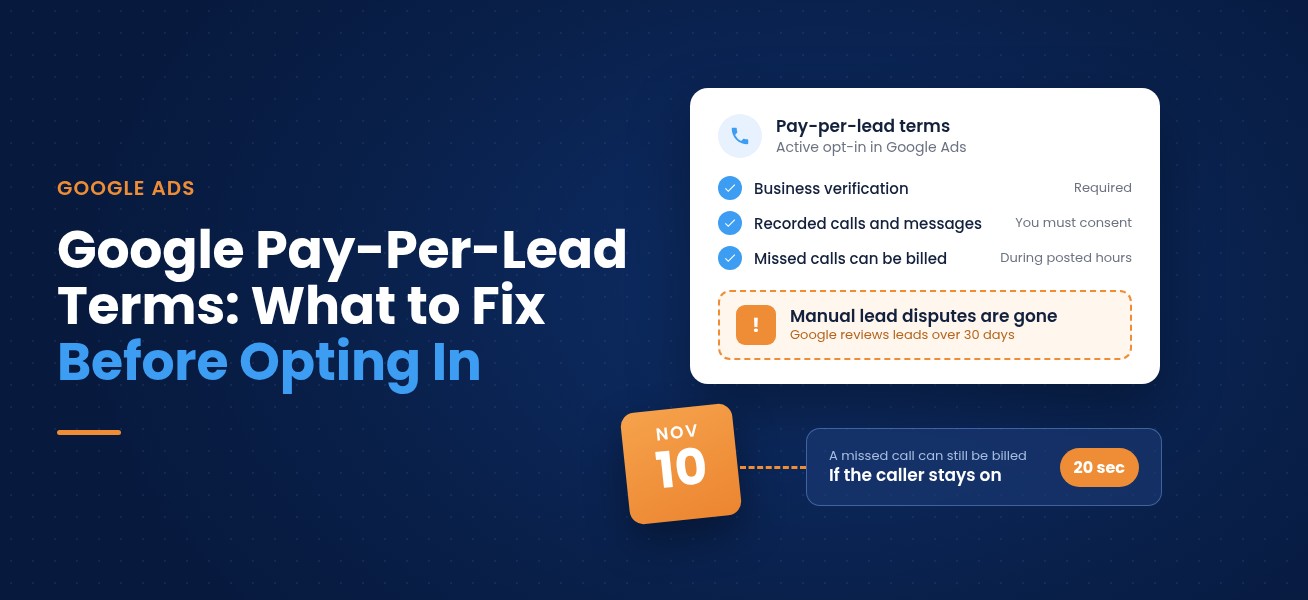
Quick answer: On November 10, 2026, Google Ads started rolling out a setting called "Ads with pay-per-lead goals terms." You have to actively accept it before you can use pay-per-lead goals in Performance Max, which is the campaign type Local Services Ads are moving into. The terms cover business verification, permission for Google to use your business content, the recording of calls and messages your ads generate, and your responsibility for service quality and customer disputes. Google judges lead quality on its own over 30 days, manual lead disputes are gone, and a missed call can still be billed. Before you click accept, fix your phones, your Business Profile and your lead tracking.
What changed on November 10
Search Engine Land reported the new setting the day it showed up, after Google Ads specialist Natasha Kaurra spotted it. Two details from that report matter more than the headline:
- Seeing the setting does not mean your account is eligible for pay-per-lead campaigns.
- Accepting it does not mean your account has moved to the new model. Eligibility, verification, lead pricing and credits are handled separately.
The terms themselves are not brand new. Google's Additional Terms for Ads with Pay-per-lead Goals are labeled "a/k/a Local Services by Google" and were last modified August 24, 2026. What's new is that Google Ads now asks you to opt in to them directly.
That fits what Google says about the product. Its help page on pay-per-lead goals for Performance Max says these campaigns are "built on the same models as Local Services Ads." If you already run LSA, this is the same deal moving into the Google Ads interface. Our post-migration checklist covers what happens to budgets, bidding and reports when an LSA account moves over.
What the pay-per-lead terms actually require
We read the full terms document. Here is what it asks of you, in plain English.
Business verification and accurate information
You must meet Google's Minimum Provider Requirements, give "honest, complete, and accurate information," and cooperate when Google or its partners check your identity, your team or your services. You may have to recertify from time to time, and Google can deny access if you stop meeting the requirements.
The Performance Max help page adds that you need a verified Google Business Profile, a U.S. location, and a supported business category. Additional verification and background checks can apply depending on your category and location.
Recorded customer communications
By accepting, you authorize Google to "access, monitor, and record telephone calls, text messages, live chat, and other communications" that start from these ads. You are also on the hook for getting the permissions local law requires and for telling your staff their calls may be recorded.
This is the term we'd flag first for medical and dental offices. If your front desk handles patient calls, talk to whoever handles your compliance before anyone clicks accept.
Service quality and disputes
The terms say a customer's satisfaction "is solely your responsibility," and it is up to you to resolve disputes between you and your customers. Google may also share how often and how quickly you respond to messages, along with ratings and reviews of your work.
Your content
You give Google a broad license to use the data and content you submit, including business information and branding. Most local businesses won't mind, but know it's in there.
How Google judges lead quality now
You pay for leads, not clicks. Under Google's How leads work page, a valid lead is any of these:
- An answered call, or a call back where you reach the customer
- A missed call during business hours where the caller stays on the line more than 20 seconds
- A voicemail
- A text message or email
- A booking request
Google "continuously assesses lead quality over a 30-day period." If its systems decide a lead was poor quality, a duplicate or invalid, a credit is applied to your account automatically. Each lead shows a Charge Status of Charged, Not charged, In review or Credited.
What you can no longer do is argue a specific charge. Google's lead quality and budgets page says "manual lead disputes are no longer supported." Your only tool is the "Rate this lead" survey on the Leads page, which starts an automated review and may lead to a credit.
There is one exception that matters for our healthcare clients. Google says call recordings and lead credits are not available for health care verticals or tax specialists in the U.S. If your category falls under health care, plan as if a bad lead stays billed.
Bidding is automated too. Campaigns default to Maximize Conversions, Target CPA is the only other choice, and manual bidding from the old LSA portal isn't supported. Lead prices vary by location, job type, lead type and bid strategy.
Why a missed call can still cost you
This part catches the most owners off guard. If a call comes in during your business hours, nobody answers, and the caller stays on the line for more than 20 seconds, it counts as a valid lead.
A few rules decide whether you pay:
- "Business hours" are your Google Business Profile hours. If you run an ad schedule, unanswered calls are only charged when they fall inside both your ad schedule and your business hours.
- Voicemail counts as connected. A business-hours call that rolls to voicemail or a greeting is charged after 20 seconds, whether the caller leaves a message or not.
- Phone menus change the timer. If callers have to press a key and they hang up without pressing one, there's no charge. Once they press a key, the 20-second clock starts.
- Repeat contacts within 15 days aren't charged again, as long as they come from the same number or email.
We walked through this rule in detail when it first hit LSA in our post on Google charging for missed calls. The short version: if your profile says you're open until 7 and nobody picks up after 5, you are paying for those two hours.
Readiness checklist before you opt in
This is what we would check in your account before accepting the terms.
1. Match your Google Business Profile hours to the hours someone answers the phone
This is the cheapest fix there is.
2. Call your own number
Do it at lunch and again at 4:45 on a Friday. Listen to what a new customer hears.
3. Decide who answers when the front desk can't
That might be a second person, an answering service or an AI receptionist. Keep in mind that an answered call is still a billable lead, so this only pays off if it books work.
4. Put tracking on the lead number
Google lets you edit the number leads route to. Pointing it at a CallRail tracking number gives you your own record of every call, including the ones you missed, by day and hour.
5. Get legal sign-off on call recording
Make sure the consent language and staff notice the terms require are in place, and confirm whether your vertical is treated as health care.
6. Export your current lead history and costs
You'll want a baseline when cost per lead moves.
7. Plan how leads reach your CRM
Lead data that sits only in Google Ads is hard to tie to revenue. Sending call and form outcomes to HubSpot and back into Google Ads through offline conversion tracking shows you which charged leads became customers.
8. Pick one person to review the Leads page every week
With no manual disputes, the survey is your only feedback, and someone has to use it.
Who should opt in, and who should wait
Good fit: Home service companies such as plumbing, HVAC, roofing, lawn care and pest control that already answer reliably during posted hours and track their calls. Google moved these categories into Performance Max first, as we covered in our migration checklist. See how we run home services PPC.
Wait and prepare: Practices where call recording raises privacy questions, or where lead credits won't apply. That includes many dental and plastic surgery offices. Get the compliance answers first.
Not yet: Google says professional services categories come to pay-per-lead goals in Performance Max in 2027, so law firms can't run pay-per-lead goals in Performance Max yet. That gives you time to tighten intake now.
Skip it for now: Any business that can't staff the phones during its posted hours. Fix that first, or every missed call can end up on the bill.
How Conversion Pipeline helps
We've managed Google Ads campaigns since 2010. We're also a HubSpot Platinum Partner, which matters here because a charged lead only means something once you know if it turned into revenue.
For pay-per-lead campaigns, we typically:
- Review your Business Profile hours, ad schedule and call path before you opt in
- Set up CallRail so missed calls show up by hour and source
- Connect lead outcomes to HubSpot so you can see cost per customer, not just cost per lead
- Watch the Charge Status column and lead quality after launch
Learn more about our PPC management and revenue operations work, or start with a free PPC audit. If your account is already set up well, we'll tell you so.
Frequently asked questions
What are Google's pay-per-lead goals terms?
They are Google's Additional Terms for Ads with Pay-per-lead Goals, also known as Local Services by Google. Starting November 10, 2026, Google Ads began asking advertisers to actively opt in to them before using pay-per-lead goals in Performance Max.
Does accepting the terms mean my account can run pay-per-lead campaigns?
No. Search Engine Land notes that accepting the terms doesn't confirm eligibility or set lead pricing. You still need a verified Google Business Profile, a U.S. location and a supported category.
Can I still dispute a bad lead?
Not manually. Google says manual lead disputes are no longer supported. It reviews leads automatically over 30 days and credits poor quality, duplicate or invalid ones. You can rate a lead with the survey on the Leads page, which starts an automated review.
Will I be charged for a missed call?
Yes, if the call comes in during your Business Profile hours (and inside your ad schedule, if you use one) and the caller stays on the line for more than 20 seconds. Voicemail during business hours counts too.
Are healthcare practices treated differently?
Yes. Google says call recordings and lead credits aren't available for health care verticals in the U.S., so automatic credits for bad leads won't apply to those accounts.
What should I do before opting in?
Match your profile hours to your real phone coverage, track calls with your own system, confirm call-recording consent with your compliance contact, and decide who will review leads each week.
Not sure you're ready?
If you want a second set of eyes before you accept Google's terms, request a free PPC audit or contact our team. We'll look at your profile hours, call routing and tracking, then tell you plainly whether pay-per-lead makes sense for you right now.
Free audit
Find out if your business shows up in AI search
Our free AI Visibility Audit checks how your business shows up in ChatGPT, Google AI Overviews, Perplexity and Gemini, then tells you what to fix first.
- Seeing the setting does not mean your account is eligible for pay-per-lead campaigns.
- Accepting it does not mean your account has moved to the new model. Eligibility, verification, lead pricing and credits are handled separately.
- Google judges lead quality on its own over 30 days, manual lead disputes are gone, and a missed call can still be billed.
- Before you click accept, fix your phones, your Business Profile and your lead tracking.