By Michael Delpierre, CEO, Conversion Pipeline Published November 4, 2026.
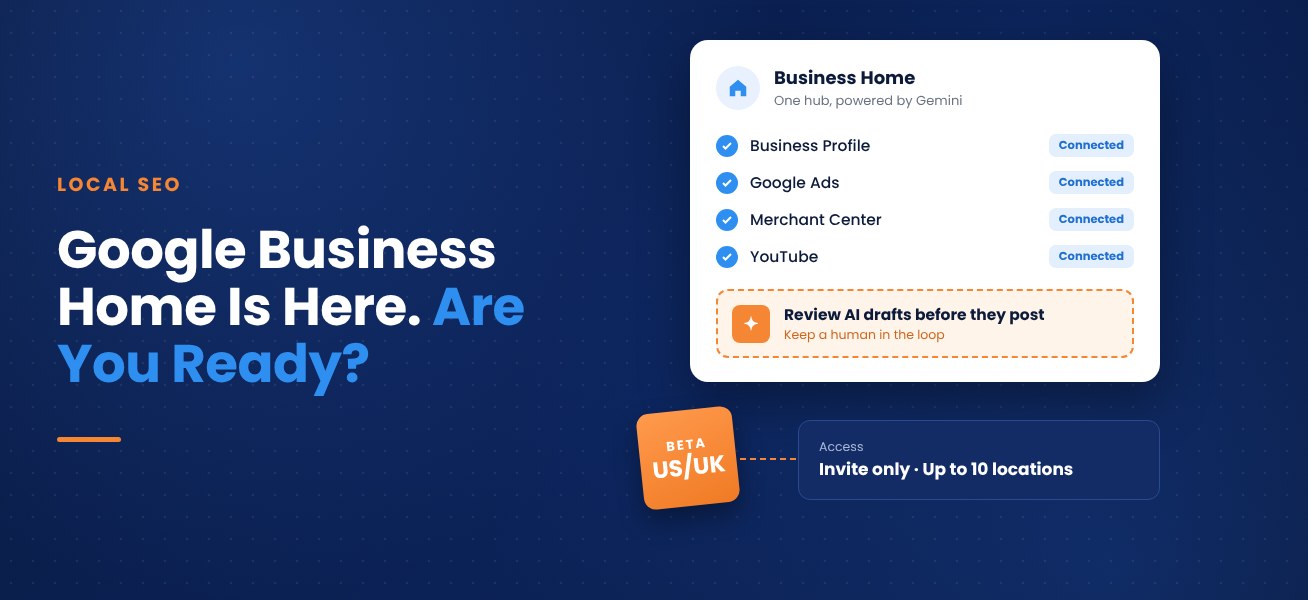
Google is testing a new dashboard called Business Home, and if you run a local business or handle marketing for one, you will want to know what it is before an invite shows up in your inbox. The short version: it pulls Google Business Profile, Google Ads, Merchant Center, and YouTube into one AI-powered hub. Right now, it is a closed beta, and Google picks who gets in.
Conversion Pipeline has been watching the rollout closely. Below is what the new Business Home tool does, who can get access, what Google still has not explained (Shocker, right?), and what we are telling our own clients to do in the meantime.
What Is Google Business Home?
Google's help documentation calls Business Home a closed beta available only to select business categories in the US and the UK. Google describes it as a growth partner built with Gemini models that connects the tools you already use to run your business online.
"It is a beta, but I just received an email with access to the new Google Business Home. Google wrote, 'This beta experience brings together your Business Profile, Merchant Center, YouTube, and Ads accounts all in one place.'" Barry Schwartz, Search Engine Roundtable, October 22, 2026
Schwartz also pointed out something longtime local marketers will recognize. Google once had a standalone dashboard for Google My Business, then dropped it so owners could edit listings right inside Search and Maps. Business Home brings the dashboard back, only this time Gemini sits at the center of it. He noted that Google seems to have been trickling access out to some businesses for the past couple of months.
What You Can Do Inside It
- Create content with AI. Write text posts and generate studio-quality product photos. Early coverage also mentions a Creative Lab for ad copy and social visuals, and a Brand Kit that stores your logo, fonts, and voice.
- Manage your locations. Change hours, addresses, phone numbers, and websites. Edit menus, services, in-store inventory, and pickup or delivery options. Upload photos and videos and read and reply to reviews.
- Get guidance on what to do next. The dashboard surfaces prioritized steps based on your data. Google says that over time it will spot things like a sudden jump in local demand and help you publish a seasonal offer across social media.
- Message customers. AI-powered messaging runs through RCS (Rich Communication Services) for Business.
- Track performance. Publish content and see how it performs without hopping between tools.
From what we can tell, Business Home sits on top of your existing Google accounts. Google has not announced that Business Profile Manager, Merchant Center, or the Ads interface are going away, and you can still manage your profile directly in Search and Maps.
Who Qualifies for the Beta
You cannot apply. Google emails invitations to the businesses it selects. Based on Google's documentation and early reports, here is what the beta requires:
- An invitation. Only select business categories are being invited, and Google has not published the full list.
- A US or UK business. Nothing is available outside those two countries yet.
- A verified Business Profile. Unverified listings are out.
- Fewer than 10 locations. Google's help page says you can connect and manage up to 10.
- One type of business. It handles a single business or chain, so a restaurant owner who also runs a retail shop under the same account would hit a wall.
Agencies should read that last requirement twice. Business Home is not built for juggling a roster of unrelated clients, so keep your current access and reporting setup in place for now.
What It Means for Your Local SEO
Let's be clear about one thing. Business Home is a place to manage your listing. It does not change how Google ranks you, so getting an invite will not push you up in the local pack. Rankings still come down to relevance, distance, and prominence.
Where it could help is consistency. Most small business owners know they should post regularly, answer reviews, and keep hours and photos current. Most also let it slide because the work lives in four different places. One dashboard with AI-drafted posts removes a lot of that friction, and that is where we expect the real payoff.
It also fits a pattern we keep seeing. Google is putting AI into how businesses are found and how they are managed. As those systems decide which businesses to recommend, a complete, current, well-reviewed profile is going to matter more, not less.
Keep a Human in the Loop
Google has not shared a full approval and permission model for everything Business Home can do. Until it does, treat Gemini's output as a first draft. Here is how we would approach it:
- Read every AI-written post and ad before it goes live.
- Make sure generated product photos match what a customer will get.
- Do not let AI decide anything involving ad spend without someone checking the numbers.
- Review replies to customers. A review response that misses the actual complaint can do more harm than no reply at all.
- Check Creative Lab output against your brand guidelines.
What to Do Right Now
If you have an invite, start small. Connect your profile, look at what Gemini suggests, and compare it to what you would have done anyway. Try the content tools on low-risk posts before trusting them with anything important.
If you do not have an invite yet, you can still get ready:
- Confirm your profile is verified and your primary category matches what you actually do. Google has not said a category change earns an invite, but an accurate category helps your profile either way.
- Audit your listing. Hours, services, menus, attributes, and photos should all be current.
- Start answering reviews on a regular schedule. The habit will carry over to whatever tool you end up using.
- If you sell products, clean up your Merchant Center feed.
- Write down who has access to your Business Profile, Google Ads, Merchant Center, and YouTube accounts, so permissions are clear when a combined hub reaches you.
Frequently Asked Questions
What is Google Business Home?
A closed-beta dashboard that brings Google Business Profile, Google Ads, Merchant Center, and YouTube together, with AI tools built on Gemini.
How do I get access?
You cannot request it. Google sends invitations to eligible owners and managers of verified profiles in selected categories in the US and UK.
Does it replace my Google Business Profile?
No. It sits on top of your profile, and you can still edit it in Search and Maps.
How many locations can I manage?
One business or chain, up to 10 locations.
Will it improve my local rankings?
Not directly. It is a management tool. It may help you keep your profile fresher, which supports better local results over time.
Want a Second Set of Eyes on Your Profile?
Conversion Pipeline has been a Google Partner since 2012, and our team handles local SEO, Google Ads, and Business Profile work for clients in Virginia, Tennessee, and beyond. If you want your listing in good shape before Google's new tools reach you, give us a call.
Sources: Google Business Home Help (support.google.com/businesshome), Search Engine Roundtable (Oct. 22, 2026), Vizup (Oct. 29, 2026). Details reflect public information as of early November 2026 and may change as the beta evolves.
About the author
Michael Delpierre is CEO of Conversion Pipeline, a digital marketing agency he founded in 2009 with offices in Fairfax, Virginia and Nashville, Tennessee. The agency has been a Google Partner since 2012, and Michael works on local SEO, paid search, Google Business Profile, and AI search strategy for home services, medical, B2B and professional services clients.
Free audits
Find out where your ad spend and leads are leaking
Our free PPC audit digs into your Google Ads account for wasted spend, weak tracking and missed opportunities. Want the bigger picture? A free lead-source mini-audit shows which channels actually bring in your calls and form fills.