
By Michael Delpierre, CEO, Conversion Pipeline Published October 2026.
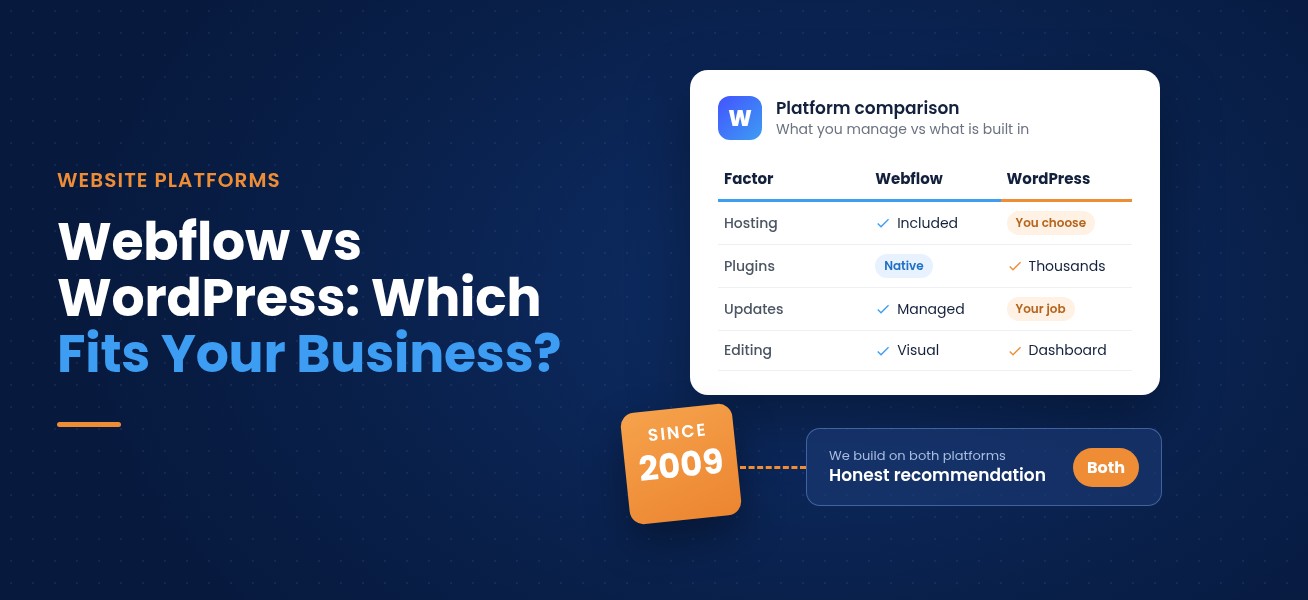
If you want a fast, secure marketing site your team can edit without touching plugins, Webflow is usually the better fit. If you need a huge library of add-ons, a complex WooCommerce store, or full control over your own server, WordPress still wins. Both can rank well and convert well. The right choice comes down to who will maintain the site, what it has to do, and how much ongoing upkeep you are willing to own.
- Custom design, clean code
- No plugins to patch
- Marketers edit on the page
- Plugins for almost anything
- Your choice of host
- Scales for large stores
We have been building websites since 2009 and have been a Google Partner since 2012. Our team builds sites on both platforms, so this is not a sales pitch for one over the other. It is the same conversation we have with clients before we quote a single page.
The quick comparison
| Factor | Webflow | WordPress |
|---|---|---|
| Cost | Site plan includes hosting. Basic from $15/mo, CMS (Premium) from $25/mo, billed yearly | Software is free. You pay separately for hosting, themes, premium plugins and upkeep |
| Design control | Visual, pixel-level design with clean code and no theme limits | Unlimited with a custom theme; prebuilt themes and page builders add limits and bloat |
| SEO | Meta tags, alt text, 301s, canonicals and sitemap built in; fast by default | Strong, usually through SEO plugins and careful setup |
| Security | Managed hosting, SSL and platform updates; no plugins to patch | Your responsibility: core, theme and plugin updates, backups, user roles |
| Maintenance | Light. Mostly content, forms and integrations | Ongoing. Updates, compatibility checks and backups |
| Plugins vs native | Core features built in; extras via integrations or custom code | Largest plugin library on the web for almost any feature |
| CMS | Designer-friendly collections and on-page editing for marketers | Mature, flexible content system with custom post types and deep roles |
| Hosting | Included and managed by Webflow | Your choice of host; speed and uptime depend on it |
| Best for | Lead generation and service business sites edited by marketing teams | Large stores, plugin-dependent builds and teams with a developer |
Webflow plan prices from our Webflow pricing guide, at the time of writing. Webflow fees are separate from agency build costs.
Cost: what you actually pay for
The two platforms charge in different ways, and that is where most comparisons get muddy. WordPress software is free and open source. What you pay for is everything around it: hosting, a theme, premium plugins, security tools, and the developer time to keep those pieces updated and working together. Spread across several vendors, the real total is easy to underestimate.
Webflow bundles hosting into a single Site plan. Those fees go to Webflow, not to us, and they are separate from what you pay an agency to design and build the site. When we build a Webflow site, it is staged in our agency Workspace, so most clients only start paying Webflow once the site launches on their domain.
Webflow plans billed yearly, at the time of writing.
For build costs, our Webflow pricing guide lays out our starting prices. The final number depends on page count, integrations, ecommerce and migration work.
Design control and editing
Webflow is a visual development platform. Designers build directly in the browser and the platform writes clean HTML and CSS behind the scenes, so custom layouts and interactions do not depend on a theme someone else wrote. Once the site is live, your marketing team edits text, images and CMS content right on the page without seeing the layout controls. That combination is the reason our webflow builds lean on custom layouts instead of templates.
WordPress gives you design freedom in a different way. A custom theme can look like anything, and our WordPress design and development team builds those from scratch for clients who need them.
- Pixel-level visual design
- On-page editing for marketers
- Fewer off-the-shelf templates for unusual needs
- Custom themes can look like anything
- Prebuilt themes and page builders add bloat
- Can lock you into one vendor's builder
If the site's main job is generating leads and your team wants to edit it themselves, we start the conversation with Webflow. If the site depends on a specific plugin or a large store, we start with WordPress. Then we check the details before anyone signs anything.
SEO and AI search
Neither platform ranks your site for you. Search performance comes from strategy, content and technical health, which is why we treat SEO as its own discipline instead of a box you tick at launch.
WordPress can match all of this, usually through SEO plugins and careful configuration, and it gives developers more room for advanced technical setups.
Structure matters more than ever as AI tools like Google's AI Overviews and ChatGPT pull answers from well-organized pages. Clear headings, direct answers and schema markup help on both platforms, and our AI SEO services are built around exactly that.
Security and maintenance
This is the biggest practical difference between the two. On WordPress, security is your job, or your agency's. The core software, the theme and every plugin need regular updates, and each plugin is another piece of code that can break or open a door.
- Hosting and SSL
- Platform updates
- No plugins to patch
- HTTPS everywhere
- Ongoing backups
- Locked-down user roles
- Scheduled core, theme and plugin updates
A Webflow site still needs attention. Content needs updating, forms and integrations need testing, and your pages still need regular SEO audits. It just means far less time on upkeep your customers never see.
Plugins vs native features
WordPress has the largest plugin ecosystem on the web. Need a booking engine, a membership portal, a learning platform or an unusual integration? Someone has probably built a plugin for it. That flexibility is the main reason we still recommend WordPress for certain projects.
Webflow gives you fewer moving parts and fewer things that can conflict after an update. WordPress gives you an add-on for almost anything.
Webflow takes the opposite approach. Forms, CMS collections, interactions, hosting and SEO controls are built in, and anything else connects through integrations or custom code.
CMS and hosting
Both platforms handle blogs, case studies, team pages and other repeating content well. The differences show up in who edits the content and who runs the server.
Webflow CMS
Design a template once, then add items through a simple editor. Ideal for teams that publish often. Larger sites should check each plan's item limits.
WordPress CMS
The more mature system, with custom post types, deep user roles and an editor millions already know. Strong for big libraries and multi-author workflows.
Webflow hosting
Part of the platform. No server, caching or CDN to manage. Pick a Site plan and publish.
WordPress hosting
Your choice of host and full control of your server and data. Speed and uptime depend on the host and its setup.
Ecommerce
Webflow Ecommerce works well for brands with a focused catalog that want a fully custom storefront. WordPress with WooCommerce scales further for large catalogs, complex shipping rules and industry-specific extensions. We build e-commerce websites on both and recommend one based on catalog size and how the store runs day to day.
Still weighing it up?
Tell us what the site needs to do and we will tell you which platform fits.
Which should you choose?
- You want a custom-designed marketing site that loads fast and looks exactly the way you planned.
- Your team wants to update pages and publish blog posts without calling a developer.
- You would rather not manage plugin updates, security patches or hosting.
- Your site is mainly about generating leads, booking calls and building credibility.
- You rely on specific plugins or integrations that Webflow cannot match.
- You run a large WooCommerce store or a complex membership or learning site.
- You want full ownership of your hosting environment and your code.
- You have a developer or agency ready to handle ongoing maintenance.
If you serve local customers, like the home services, healthcare and professional service companies on our industries page, Webflow is often the cleaner choice because the site's main job is turning searches into calls and form fills. Content-heavy publishers and stores with deep catalogs often land on WordPress.
Get an honest platform recommendation
Tell us what your site needs to do. We will tell you which platform fits, what it will cost to build and what you will pay the platform each month. Call 877-877-0542 or send us a note.
Switching from WordPress to Webflow
If you are moving an existing WordPress site onto webflow, a good migration protects what you have already earned. Skip these steps and you can lose rankings that took years to build.
- 1Review
Run a full technical review so you know which pages carry the most value.
- 2Map URLs
Map every old URL to its new home.
- 3Redirect
Set up 301 redirects for every changed URL.
- 4Carry over
Move metadata, titles and descriptions across.
- 5Verify
Check analytics and tracking before and after launch.
Our HubSpot website migration checklist covers the same principles, and most of it applies no matter which platforms you are moving between.
Either way, build for conversions
The platform is only the foundation. A website earns its keep when visitors understand your offer, trust you and take the next step.
That is why every build we do, Webflow or WordPress, includes clear calls to action, simple forms and pages structured around what your buyers are looking for. After launch, our conversion rate optimization team tests and refines those pages so the traffic you already have produces more leads.
Frequently asked questions
Is Webflow better than WordPress for SEO?
Neither platform is better for SEO on its own. Webflow includes the core SEO controls and tends to produce fast, clean pages without plugins. WordPress can do the same with the right plugins and setup. Rankings come from content, structure and technical health on either one.
Is Webflow cheaper than WordPress?
It depends on how you count. WordPress software is free, but hosting, premium themes, plugins and maintenance add up. Webflow charges a Site plan that includes hosting, starting at $15 per month billed yearly for a Basic site at the time of writing. Agency build costs are separate on both platforms.
Is Webflow more secure than WordPress?
Webflow manages hosting, SSL and platform updates, and there are no plugins to patch, which removes the most common causes of WordPress security problems. WordPress can be very secure too, but it needs regular updates, backups and careful user permissions.
Can my team edit a Webflow site without a developer?
Yes. Webflow's editor lets your team change text, swap images and publish CMS content like blog posts directly on the page, without access to the design controls.
When is WordPress the better choice?
WordPress is usually the better fit for large WooCommerce stores, membership or learning sites, projects that depend on specific plugins, and teams that want full control of their own hosting.
Can you move my WordPress site to Webflow without losing rankings?
Yes, if the migration is planned carefully. We map every URL, set up 301 redirects, carry over metadata and check tracking before and after launch so the rankings you have earned come with you.
Does Conversion Pipeline build on both platforms?
Yes. We have built websites since 2009 and design and develop on both Webflow and WordPress. We recommend the platform that fits your goals, budget and team, not the one we prefer.
Free audits
Find out where your ad spend and leads are leaking
Our free PPC audit digs into your Google Ads account for wasted spend, weak tracking and missed opportunities. Want the bigger picture? A free lead-source mini-audit shows which channels actually bring in your calls and form fills.