
By Michael Delpierre Published October 2026. Last updated October 8, 2026.
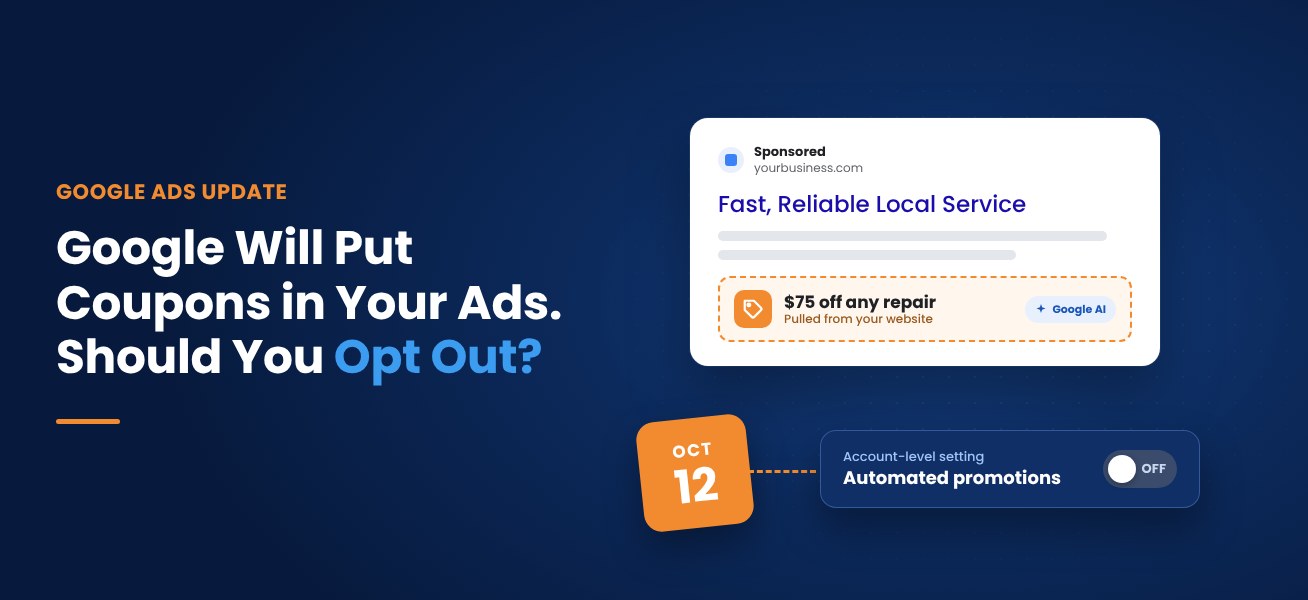
Starting October 12, 2026, Google Ads will automatically pull promotions like coupons and deals from your website and attach them to your ads. It applies to Search and Performance Max campaigns that have linked location assets and no promotion assets of their own. It’s on by default, and the only off switch is account-wide. Google’s email, published by Search Engine Roundtable on October 5, gave advertisers about a week’s notice. If your site has old coupon pages, conditional offers or financing terms, we’d make the call before October 12. Here’s who should opt out, who can leave it on, and the exact clicks.
What Google is turning on
Google’s About Automated promotions help page describes it this way: Google identifies promotions on your website landing pages, such as “Buy one get one free,” and attaches them to eligible Search and Performance Max campaigns. Google’s example is a page advertising “20% off on black sweaters.” The discount gets extracted and shown in your ad.
The rules, per Google:
- Eligible campaigns: active Search or Performance Max campaigns with attached location assets, including Local Ad campaigns.
- Manual promotions win. Any campaign that already has manual promotions running is skipped.
- Short shelf life. Each automated promotion is eligible to serve for less than 24 hours. After that it can be re-enabled as long as Google can still verify the promotion is visible on your site. Google says this will change once it can read promotion start and end dates.
- Sources beyond your landing pages. Google’s account-level automated assets page says the feature sources deals “from your website and other sources.”
- Not just Search results. Google says sourced promotions may serve with your ads on Google Search “or across Google’s broader ad inventory.”
One more detail from the email, reported by PPC Land: assets with zero impressions won’t appear in your account. You’ll see what served, not what Google queued.
Why this matters for local businesses
A promotion in an ad is a promise. If Google pulls “$75 off any repair” from a page your marketing person built two summers ago and forgot to unpublish, a customer may call expecting $75 off. Google’s 24-hour re-check helps, but it checks whether the offer is still visible on your site. A stale coupon page that’s still live passes that test.
The businesses we’d worry about most:
- Home services with coupon pages. HVAC tune-up specials, “$50 off your first service,” seasonal sprinkler blowout deals. These pages pile up and rarely get taken down.
- Auto dealers. Specials pages are full of conditions: specific VINs, qualified buyers, manufacturer incentives that expire at month end, regional offers. A one-line promotion asset can’t carry that fine print.
- Plastic surgery and med spas. Pricing and package offers in medical advertising usually have terms and sometimes compliance review. You want a person approving that copy, not a parser.
- Multi-location businesses. An offer that’s valid at one location can show up attached to another.
- Financing offers. “0% for 18 months” without the qualifier is a problem waiting to happen.
Who can reasonably leave it on
If your site’s promotions are current, unconditional and maintained by someone who takes them down on time, this feature can add a useful offer to ads without extra work. A retailer with one clean, current sale page is the best case. Google’s help page also notes that overall campaign performance can improve even when clicks on the promotion itself look low, and recommends segmenting reports by click type to measure it. That’s Google’s claim. Test it against your own numbers.
Our recommendation
For home services, medical, auto and B2B advertisers, our default recommendation is off, then add the offers we want as manual promotion assets with real start and end dates. You get the promotion in the ad and keep control of the wording.
If you’d rather keep it on, there’s a middle path. Because Google bypasses any campaign that already has manual promotions running, adding a manual promotion to a campaign protects that campaign from automated ones. You can’t opt out campaign by campaign, but you can shield the ones that matter.
Whatever you choose, clean up your website. Search your own site for “coupon,” “special,” “% off” and “limited time.” Unpublish anything expired. That’s worth doing anyway, and it’s the only thing that controls what Google can find if you leave the feature on.
Check whether you even have location assets
This feature only touches campaigns with location assets. Many local businesses have them linked through their Google Business Profile. Some have them without realizing it: Google’s account-level automated assets page says that if you haven’t added locations, Google Ads may automatically match your business to known locations and add that information to create automated location assets. Google’s documentation doesn’t say clearly whether automated location assets make a campaign eligible for automated promotions, so we’d check rather than assume.
How to turn off automated promotions
From Google’s help page:
- In Google Ads, go to Assets in the Campaigns menu.
- In the filter bar, select the More (three-dot) icon and choose Account level automated assets.
- On that page, select the More (three-dot) icon again.
- Select Advanced settings.
- Open the Automated promotions drop-down, choose Off, and give a reason if prompted.
To see what Google has added, go to Assets, filter Asset type to Promotion, and look for Google AI in the “Added by” column. Hover over it for sourcing details. Because each automated promotion only serves for less than 24 hours at a time, check more than once in the first couple of weeks.
What this doesn’t cover
This change is about Search and Performance Max campaigns with location assets. Google’s notice doesn’t mention Local Services Ads, and Google’s migration guide says pay-per-lead campaigns use a limited set of assets (photos and callouts). If LSA is your main channel, our posts on the LSA missed-call rule and the post-migration checklist are more relevant this month.
Frequently asked questions
What are automated promotions in Google Ads?
Automated promotions are promotion assets Google creates by finding deals and offers on your website and attaching them to eligible Search and Performance Max campaigns that use location assets. Google turns them on by default starting October 12, 2026.
How do I turn off automated promotions?
Go to Assets, open Account level automated assets from the three-dot menu, select Advanced settings, then set Automated promotions to Off. The setting applies to the whole account.
Can I turn off automated promotions for just one campaign?
There’s no campaign-level switch. However, Google skips any campaign that already has manual promotions running, so adding a manual promotion asset to a campaign keeps automated ones off it.
How do I see which promotions Google added to my ads?
In Assets, filter Asset type to Promotion and look for Google AI in the Added by column. Promotions with zero impressions won’t appear, so check regularly.
Should a local business opt out of automated promotions?
If your site has expired coupons, conditional offers, financing terms or location-specific deals, opting out and using manual promotion assets is the safer choice. Businesses with current, simple offers can test leaving it on.
Not sure what Google will find on your site?
As part of our free lead-source mini-audit, we’ll check whether your campaigns are eligible for automated promotions, scan your site for offers Google could pull, and tell you whether we’d opt out. Then we’ll go through it on a 15-minute call. Given the October 12 start, sooner is better.
Call Michael Delpierre at 877-877-0542 or request your mini-audit. See more about our Google Ads management and free PPC audits.
About the author: Michael Delpierre is part of the team at Conversion Pipeline, a U.S.-based, in-house digital marketing agency and Google Partner with offices in Nashville and Fairfax, Virginia.
Free audits
Find out where your ad spend and leads are leaking
Our free PPC audit digs into your Google Ads account for wasted spend, weak tracking and missed opportunities. Want the bigger picture? A free lead-source mini-audit shows which channels actually bring in your calls and form fills.